Monday, June 4, 2012

May- Photo A Day Challange- Part 2

  HOLY MOLY! Is it really June!!!! I know I am running a little behind but things have been crazy over here. Aubrey has been sick and well that's another story for another post. Make sure you follow us on @yesenia_bay and link up!!

5-16
Something you are reading
 What I am not reading!

5-17
 Snack
 Dried fruit. Hey I am trying!

5-18
Something you made
A TURKEY shirt for Bay...it was SO easy!

5-19
A favorite place
Being in the water with my little mermaid! I love summa' time!

5-20
Something you can't love without
More like SOMEONE I can't live without

5-21
Where you stand
On my own two feet!

5-22
Pink
~My FAVORITE color~

5-23
Technology
My office....

5-24
Something new
New day! Thank you sweet Jesus!

5-25
Unusual
Unusual for me not to have Aubrey. I hate leaving her. I love every moment we are together.

5-26
12 o'clock
Lunch

5-27
Something Sweet
My sweet angel...she covers her face with her Binky and screams Aubrey?!?! She is hiding from momma lol

5-28
The weather today
"It's a glooooomy day"

5-29
A number
The number 5 is my favorite number..don't ask my why. 

5-30
Your personality
.......

5-31
Something beautiful
The love between a mother and a daughter

Here is my part 1 of May if you missed it!
Hope you all have a great start to the June month. 

Photobucket

Friday, June 1, 2012

Did you know?

The Cuddle Advantage

"Kissing your baby could actually boost her brain as she grows, a new study in Proceedings of the National Academy of Sciences shows. Researchers observed parents with their kids (ages 3 to 6) then took images of children's brains four years later. The hippocampus of tots with nurturing folks was almost 10 percent larger than that of kids with less nuzzle-y parents. The effect may be especially strong in infancy, when development is at a rapid clip. Another excuse to snuggle!"
American Baby Magazine

With that said GO LOVE ON YOUR BABIES! I bet Aubrey's brain is 20 percent bigger I mean I kiss her like every 2 seconds. I just can't get enough of that little girl! Hope everyone has a super duper cuddly weekend! 

Photobucket

Wednesday, May 30, 2012

What I'm Loving Wednesday

Happy Hump Day!!!! 
It's Wednesday... and I am LOVING well everything Aubrey!


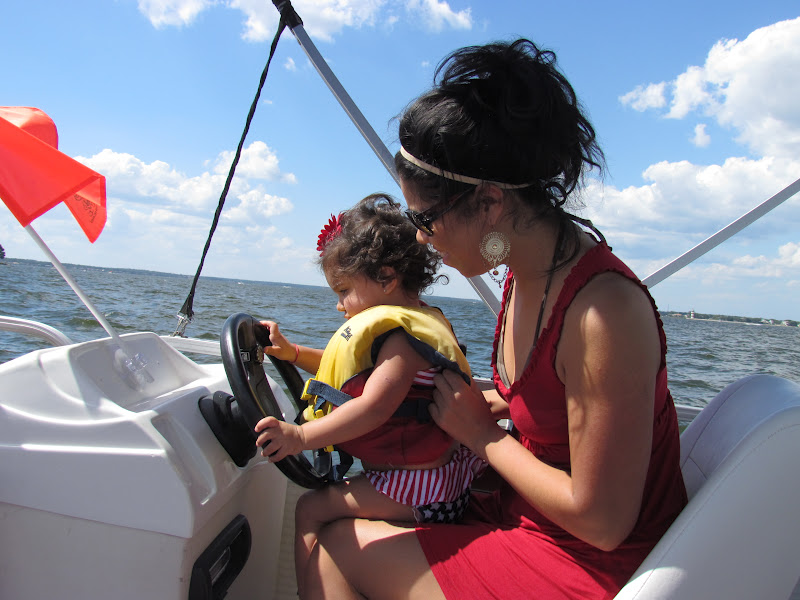
I'm loving this picture of Bay this past weekend. It was her first boat ride and she loved it!
I told her that her stepdad will one day buy us one.
{I have to find him first}

I'm loving The Little Gym. Bay is finally coming into her own but unfortunately its our last week. Dance class here we come!

I'm loving this picture. This is what I think she is saying.
{"Psshhh! I am too cool for this class" Aubrey}


I'm loving this sweet frame that a friend gave me as a gift just because.
Look at the sweet Princess!

I'm loving Kohls and everything in it!  Hahahaha

I'm loving this sweet picture.
The 2 most important people in my life my dad and my daughter.

I'm love love love looking at old pics when Bay was little. I treasure those sweet moments.

I'm loving these daughter mother quotes!

Until next Wednesday.....

Photobucket

Tuesday, May 29, 2012

Memorial Weekend

 First I would like to thank those who have and are still serving this great country of ours. Thank you for all you do to keep us safe.

Memorial weekend was AMAZING to say the least. We had a condo over looking the lake. It was just breath taking. We spent every night chatting and just watching those beautiful waves.We also fished but unfortunately didn't catch much. We even cooked those darn fish steak. Haha! (sigh) We rented a boat and jet skis. It was Aubrey's first time on a boat and she LOVED it! Everyone was so impressed as to how calm she was. I mean she is my daughter..I knew she was going to do great! We also ate way too much and my drinks consisted of coffee, tequila and wine. Lets just sat I am glad I am home and back to work!


Photobucket

Friday, May 25, 2012

Fill in the Blank Friday.

It's Friday ya'll! I am so sticking HAPPY because it's Memorial weekend which means 3 day weekend. We are going to be hanging out by the lake for the whole weekend fishing, boating, BBQing, drinking and soaking up some sun! Yaaahoooo!


1.  The best surprise ever would be,   winning the lottery! Oh the things I would do with all that money! 

2.      My pregnancy and the birth of Aubrey  is my most favorite memory .

3.  The hardest, but most worthwhile thing I've ever done was     being a single mom. I have to be mom and dad 24/7. I have to be sweet and kind along with the provider and the disciplinary. I pray every day that I find a good man I can share this role with lol 

4.  The best part of my day is   oh man I have so many. The moment I walk into Aubreys school and her face lights up when she sees me. The moment when its just her and I on that rocking chair and I am reading her a bed time story. The moment when I tell her lets pray and she gives me her hand and after I say amen she repeats.

5. Something I like that most people don't is        black coffee. Just straight black coffee!

6. Something I am willing to fight for is     my daughter! Oh man I am not a fighter but you mess with my child and all bets are off .

7.  Something you might not know about me is   I wake up every morning at 5:30 to workout before I start my day  .


Photobucket

Thursday, May 24, 2012

How to add a BUTTON...

So I have been wondering and researching how to add a button to my blog. After a lot of googling and procrastinating I FINALLY did it!


I LOVE it! I guess blogs exchange buttons to advertise/ support each other. You will see tons of buttons on blogs to the side and if you click on the button it will take you straight to their blog. Cool, huh? I have a lot of button exchanging to do. GRAB MINE people!

____________________________________________________
I would have to thank ehow for this! Want to create one?! Read below please~

Instructions
 1.      Save your image to an online photo album (such as photobucket) or place it in a blog post and publish the post. 
2.      Retrieve the direct Internet link for the image. Through photobucket simply scroll over the image to activate the Link Option's box. Then copy the entire address that is in the Direct Link box. If you publish your button in a blog post click View Blog. Then click on the image, this will take you to a new web address where you will see only your button. Copy the entire address that is in the address bar.
 3.      Paste the button's code onto a word  document to save it until you need it. 
4.      Go to your Blogger blog and click on Layout.
5.      Choose to Add a Gadget. Click on HTML/Javascript.
6.      Type something like, "Get My Button" in the title box.
7.      Copy this code and place it in the text box.
[center][a href="http://YOUR WEB ADDRESS/" target="_blank" title="BLOG TITLE"][img alt="BLOG TITLE" src="http://IMAGE WEB ADDRESS"/][/a][center]
[/center]
[center][textarea id="code-source" rows="3" name="code-source"][center][a href="http://YOUR WEB ADDRESS/"][img border="0" src="http://IMAGE WEB ADDRESS"/][/a][/center][/textarea][/center]

All of the front brackets [ will need to be replaced with < and all of the back brackets ] will need to be replaced with >
8.      Once the code is properly formatted (with < and >), you need to replace the generic information with your information.
Replace the YOUR WEB ADDRESS with the address of your blog.
Plug in your blog's title where indicated and go back and copy the image web address and paste it in the correct location.
Make sure you delete all of the generic information. Your code should now look like the code in the photo to the left (click on the picture to enlarge). The colored information should all be replaced with your specific infromation.
9.      Save this gadget and position it where you'd like it to be. 
10.  Save your changes and click View Blog.
11.  Click on your button to make sure it takes you to the home page of your blog.
It's also a good idea to copy the code from the box and try to add the button to your blog.
To do this simply highlight and copy the code from the text box that is now visible on your blog. Then under Layout, add a HTML gadget and paste the code into the text box. Save changes and view your blog. This "new" button will not have the text box underneath (this is what your button will look like on other people's blogs.) Click on the button to make sure it brings up your blog's homepage. 
12.  Enjoy spreading the word about your blog. Let your readers know you now have a button that they can copy and place on their blogs.


Photobucket
Related Posts Plugin for WordPress, Blogger...